📦 Change Package Name
📋 Overview
The package name (also called the bundle identifier on iOS) is the unique identifier for your application on the Play Store and App Store. It must be set correctly before you release your app, as it cannot be changed after publishing without creating a new app listing.
This guide walks you through changing the package name for both Android and iOS in the eSchool SaaS mobile application.
🏷️ Package Name Naming Rules
Before choosing your package name, follow these conventions to avoid build errors or store rejections:
| Rule | Details |
|---|---|
| ✅ Lowercase only | Use only lowercase letters (a–z) |
| ✅ Dot-separated | Use dots (.) as segment separators |
| ✅ Reverse domain format | e.g., com.yourcompany.appname |
| ❌ No spaces | Spaces are not allowed anywhere |
| ❌ No special characters | Avoid @, -, _, #, etc. |
| ❌ No uppercase letters | All characters must be lowercase |
Ensure your package name matches exactly across Android, iOS, and Firebase. A mismatch between platforms is one of the most common causes of Firebase integration failures.
🔄 Steps to Change Package Name
1️⃣ Prepare the Project
-
Unzip the downloaded code. After unzipping you will have the E-School - Flutter Code folder. Open it in Android Studio or Visual Studio Code.
-
Install Flutter dependencies — open the IDE terminal, navigate to your project root, and run:
flutter pub get -
iOS only — if you are targeting iOS, also run:
cd ios
pod install
cd ..
2️⃣ Run the Rename Command (Recommended)
From v1.12.0, both apps include a rename command that sets the Android package name and the iOS bundle identifier in one step. flutter pub get in the previous step downloads it.
-
Run this command from the project root, with your own package name:
dart run change_app_package_name:main com.yourcompany.eschool -
Check the output. It lists each file it changed, with the old and the new value:
📦 Changing package name to com.yourcompany.eschool
   Android + iOS

🤖 Android · School Builder layout
   📝 android/app/build.gradle
      applicationId: com.wrteam.saas.school → com.yourcompany.eschool
      namespace: com.wrteam.saas.school → com.yourcompany.eschool
   📝 android/app/src/main/AndroidManifest.xml
      package: com.wrteam.saas.school → com.yourcompany.eschool
   📝 android/app/src/main/kotlin/com/wrteam/saas/school/MainActivity.kt
      package: com.wrteam.saas.school → com.yourcompany.eschool
      moved to: android/app/src/main/kotlin/com/wrteam/saas/school → android/app/src/main/kotlin/com/yourcompany/eschool

🍎 iOS · School Builder layout
   📝 ios/Flutter/Debug.xcconfig
      SCHOOL_BUNDLE_ID: com.wrteam.eschool.saas → com.yourcompany.eschool
   📝 ios/Flutter/Release.xcconfig
      SCHOOL_BUNDLE_ID: com.wrteam.eschool.saas → com.yourcompany.eschool

✅ Package name updated.
On Android the command renames the code too:
namespace, thepackageof each manifest, and the package and folder ofMainActivity. No file keeps the old name except the Firebase files, which you regenerate below. -
Repeat in the other app. The Student/Parent app and the Staff app are separate projects, and each needs its own package name.
The command also accepts these options:
| Option | What it does |
|---|---|
--dry-run | Shows what would change without writing anything. Use it to check before you rename. |
--android | Changes only the Android package name. |
--ios | Changes only the iOS bundle identifier. |
--plain | Prints plain text, without emoji or colour. |
Both platforms are checked before either is written. If one of them cannot be renamed, the command says why, changes nothing and stops.
Avoid a name with a word Java reserves, such as new, package, default, class or int. Android does not accept such a name for the code. For a name like com.new.package.name, the command renames only the application ID, which is the name the stores and Firebase use, keeps the code's package as it was, and says so. The app still builds.
In pubspec.yaml, change_app_package_name points to a version made for this project (v1.7.0). Do not replace it with change_app_package_name from pub.dev. On this project, the pub.dev version (1.5.0):
- Android: stops with
applicationId not foundand changes nothing. - iOS: overwrites the bundle ID setting in
ios/Runner.xcodeproj/project.pbxproj, which cuts the link toSCHOOL_BUNDLE_ID.
If you already ran the pub.dev version, run the command above. It puts the link in project.pbxproj back.
If the command changed both platforms, skip to After Changing the Package Name. The next two steps make the same changes by hand.
3️⃣ Or Change the Android Package Name by Hand
- Open
android/app/build.gradle. - Find the line that starts with
def schoolApplicationId. - Replace the second value with your package name:
def schoolApplicationId = schoolProperties.getProperty('applicationId', 'com.yourcompany.eschool')
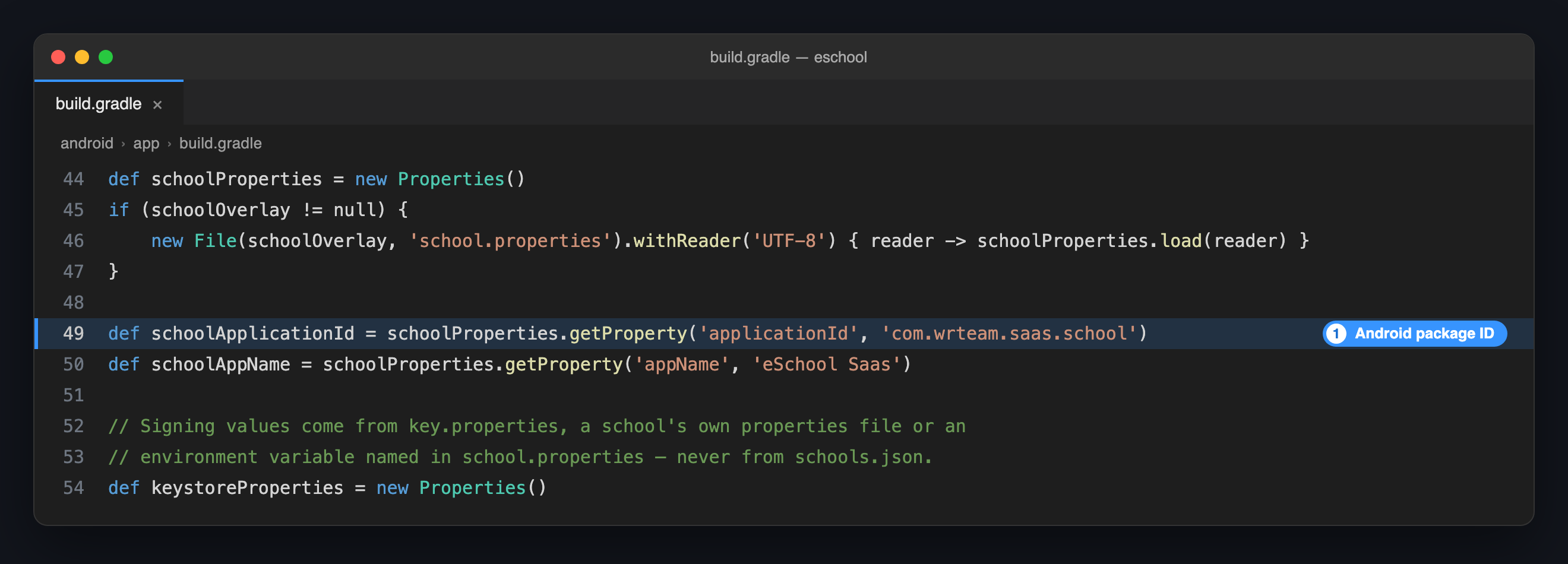
namespace in the same file, package= in AndroidManifest.xml and the Kotlin folder under android/app/src/main/kotlin/ are names used inside the code. The Play Store and Firebase only read the package ID you set above, so the app works with them left as they are. The rename command changes them as well, so that nothing shows the old name; by hand, it is safest to leave them.
4️⃣ Or Change the iOS Bundle Identifier by Hand
-
Open
ios/Flutter/Debug.xcconfigand setSCHOOL_BUNDLE_ID:ios/Flutter/Debug.xcconfigSCHOOL_BUNDLE_ID = com.yourcompany.eschool -
Open
ios/Flutter/Release.xcconfigand make the same change. Debug builds read the first file and release builds read the second.
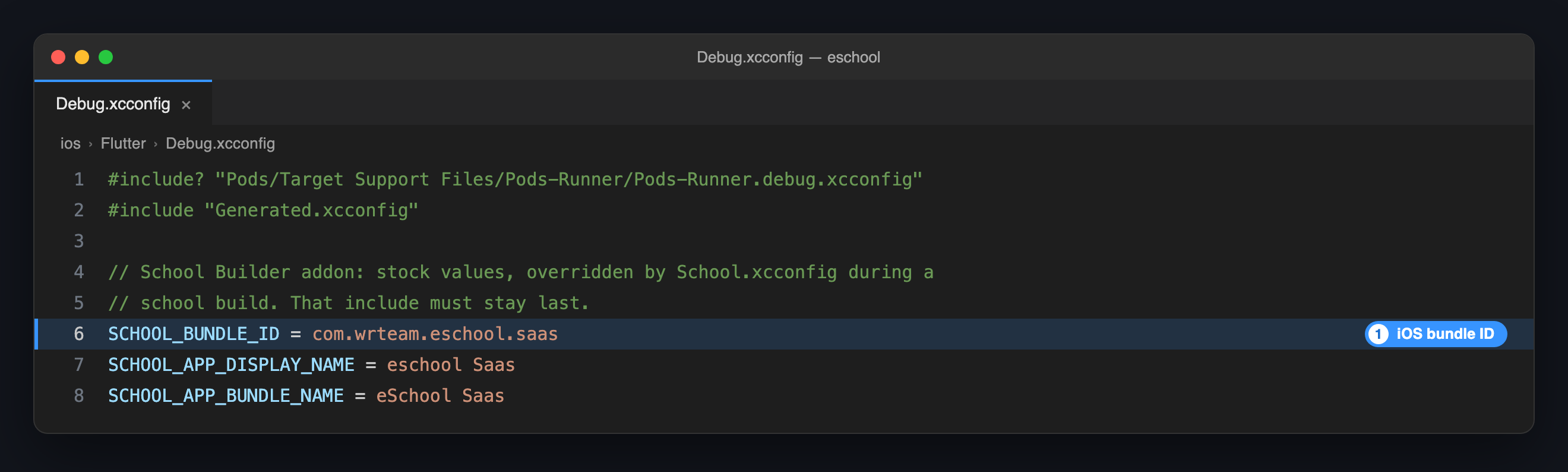
In Xcode, Targets → Runner → General → Bundle Identifier now reads its value from SCHOOL_BUNDLE_ID. Typing a bundle ID into that field cuts the link, and the Dedicated School Mobile App add-on can no longer give each school its own ID.
With the Dedicated School Mobile App add-on, edit the Default School in the builder, enter the Android package ID and the iOS bundle ID, and click Save to project. The builder writes these files for you.
✅ After Changing the Package Name
Once both platforms are updated, complete the following checklist before running the app:
- Clean the build — run
flutter cleanfollowed byflutter pub get - Update Firebase — regenerate and replace
google-services.json(Android) andGoogleService-Info.plist(iOS) with files tied to the new package name. When these files are still for the old name, the rename command prints theflutterfire configurecommand to run. See 👉 Integrate with Firebase - Verify iOS — confirm
SCHOOL_BUNDLE_IDis the same inDebug.xcconfigandRelease.xcconfig - Test on both platforms — run the app on an Android emulator and an iOS simulator to confirm everything works
If you change the package name but do not update Firebase configuration files, Firebase services (authentication, push notifications, Firestore) will fail silently. Always regenerate and replace the Firebase config files after renaming.
💡 Example
| Platform | Example Package Name |
|---|---|
| Android | com.yourcompany.eschool |
| iOS (Bundle ID) | com.yourcompany.eschool |
| Firebase Project | com.yourcompany.eschool |