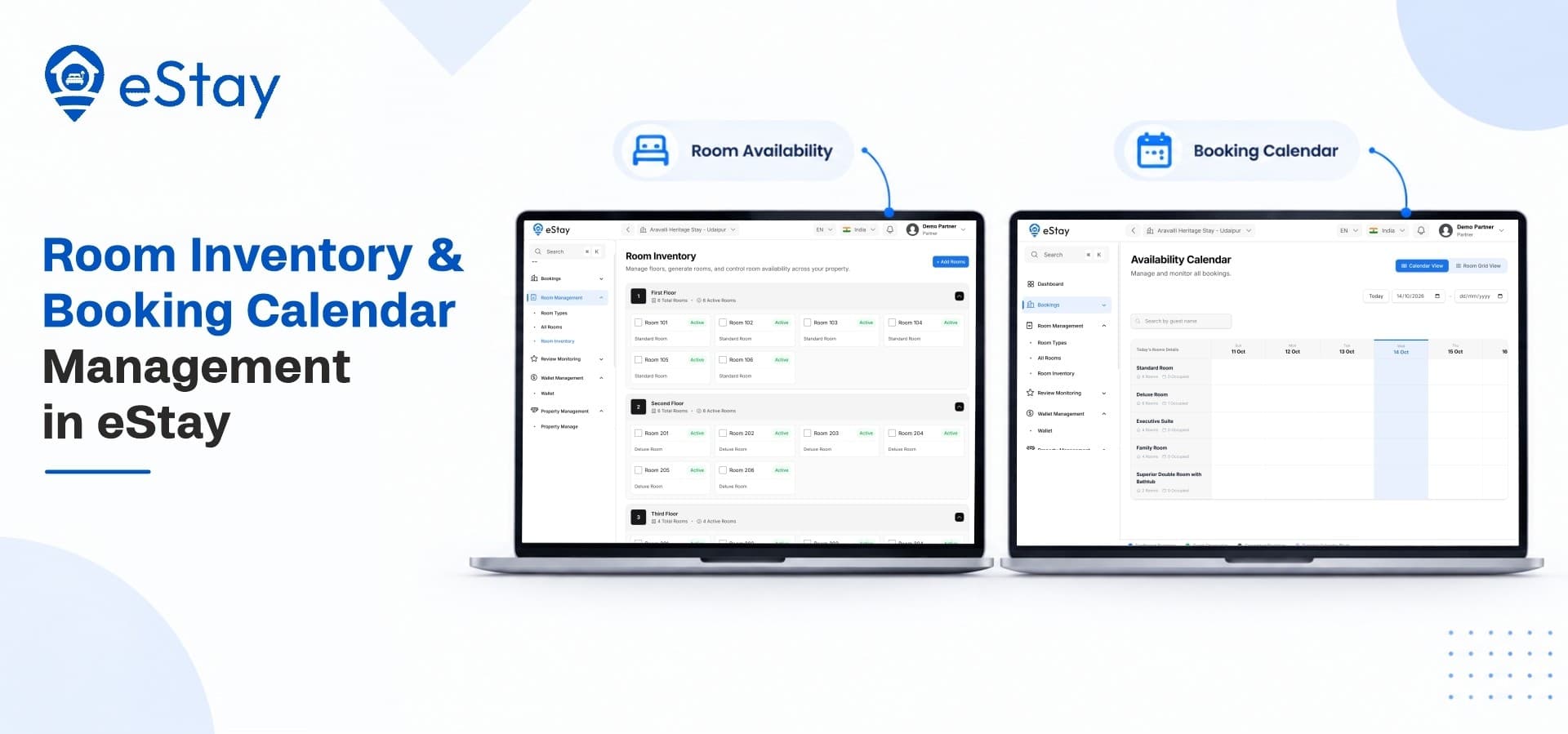
Every night a room sits empty is revenue that never comes back. Every double-booked room costs you a guest, a refund and possibly a bad review. Most of this comes down to how well a property tracks what it has to sell and when it is free. A dependable hotel booking management system gives owners one trusted view of rooms, dates and reservations, so nobody has to guess or cross-check a notebook.
This post looks at how eStay handles that job. You will see how room inventory is organized, how the booking calendar works, how reservations move from request to check-out, and how pricing, payments and policies connect to each room. Think of it as a feature walkthrough for owners who want to know exactly what they would be managing day to day.
Why Inventory and Calendars Matter More Than They Seem
Before the features, it helps to see what goes wrong without them.
The Hidden Cost of Manual Tracking
Properties that run on spreadsheets, phone calls and messaging apps usually share the same problems:
-
Two guests are promised the same room for overlapping dates
-
Staff do not know which rooms are ready, blocked or already sold
-
Rate and policy changes are applied to some rooms and missed on others
-
Owners cannot see occupancy without asking someone to count
What a Good System Fixes
Good inventory and calendar tools replace guesswork with a live record. Every room has a defined type, every date has a clear status, and every booking updates the same source of truth. That keeps guests, front-desk staff and owners looking at the same numbers.
How eStay Organizes Your Rooms
Everything in the calendar depends on how well the rooms are set up first. eStay treats this as a proper module rather than a text field attached to a listing.
Room Types and Categories
Instead of listing rooms one by one with no structure, eStay lets you group inventory into room types such as standard, deluxe, suite or family rooms. Each type carries its own details:
-
Name and description, so guests understand what they are choosing
-
Photos, shown on the detailed room page
-
Capacity, covering how many guests the room fits
-
Base pricing, which the rest of the system builds on
-
Number of units, showing how many rooms of that type you have
Once types are defined, you manage categories instead of editing dozens of individual entries. Adding a new floor or converting a room to a different category becomes a quick update.
Facilities and Amenities
Guests filter and compare on amenities, so accuracy matters. In eStay you configure facilities at the property level and attach the relevant amenities to each room type. Wi-Fi, parking, breakfast, air conditioning and similar features appear on the room page and in search filters. That helps the right guests find the right room, which means fewer questions and fewer disappointed arrivals.
Property Rules and Guest Policies
Each property can publish its own house rules, such as check-in times, pet policy, smoking rules and ID requirements. Guests see these before they pay. Setting expectations early cuts down disputes at the front desk.
The Booking Calendar: Your Live Availability Map
The calendar is where inventory turns into decisions. This is the part owners and front-desk teams open most often.
Real-Time Availability at a Glance
The availability calendar in eStay shows which rooms are open, reserved or unavailable for each date. Because the guest-facing booking flow and the admin panel read from the same data, a confirmed reservation updates availability straight away. That is the practical way a platform lowers the chance of two guests landing on the same room.
You can also use the calendar to:
-
Spot gaps between stays that could be filled with a short promotion
-
Block dates for maintenance, renovation or owner use
-
Plan staffing around busy and quiet stretches
-
Check upcoming arrivals and departures without opening each booking
The Reservation Journey, Step by Step
A booking in eStay moves through a clear sequence, and each stage is visible to the people who need it:
-
Search and selection: the guest picks dates, guests and a room type
-
Checkout: the guest pays in full, pays an advance or chooses pay at property, depending on how the listing is configured
-
Confirmation: the guest receives an instant booking confirmation and the calendar updates
-
Pre-arrival: staff review the booking, guest details and any special requests
-
Check-in and check-out: the front desk records arrival and departure
-
Post-stay: the guest can leave a review that feeds into the property's reputation
Seeing every booking in a defined stage helps teams avoid the usual mix-ups, such as an unpaid booking being treated as confirmed or a departed guest still holding a room.
Check-In and Check-Out Operations
Front-desk work runs from the same booking records. Staff can mark guests as checked in or checked out, which keeps room status accurate for the next arrival. Instead of calling housekeeping to ask who has left, the team reads the status from the system.
From the Guest's Side: How Inventory Becomes a Booking
Inventory only earns money when guests can find it, understand it and book it without friction. eStay's guest experience is built around that path.
Search, Filters and Room Pages
Guests start with an adaptive property search and advanced filters. Detailed property and room pages then show photos, amenities, rules and pricing in one place. Because these pages come directly from the inventory you configured, there is no separate copy to keep updated.
A Booking Flow Built for Mobile and Web
The Next.js PWA website gives guests an app-like experience in the browser, and pages are built to be search-friendly so properties can attract organic traffic. Guests who prefer apps can use the Flutter mobile app instead. Both sit on the same backend, so the calendar behaves the same way whichever door a guest walks through. Teams comparing online hotel booking software should check exactly this point: whether the website, the app and the admin panel read from one shared record or from several that need syncing.
Pricing, Tax, Payment and Cancellation Rules Around Each Room
Inventory is more than counting rooms. Money rules attach to each one, and eStay keeps them close to the room and the booking.
Flexible Payment Settings Per Listing
Owners can choose full online payment, partial advance collection or pay at property for each listing. Gateways such as Stripe, Razorpay and Flutterwave handle online payments. A boutique stay with a high cancellation risk might ask for the full amount upfront, while a long-standing local guesthouse might accept an advance and collect the rest on arrival.
Currency, Tax and Localization
For properties that welcome international guests, multi-currency support and country-wise tax settings keep totals accurate at checkout. This also matters for groups that run branches in more than one location.
Cancellation and Refund Management
Cancellation rules can be set per property, and refunds are managed from the admin side. Clear rules published at the time of booking protect the owner and give guests confidence. Role-based staff access lets you limit refund approval to finance team members while front-desk staff handle everyday bookings.
Promo Codes and Referral Rewards
Slow dates are easier to fill when you can attach an offer to them. Promo codes and referral rewards let you push a discount for a quiet midweek period without building a separate marketing tool.
One Calendar for Hotels, Villas and Multiple Properties
Not every business has the same shape, and the inventory model has to flex without breaking.
Single Property and Multi-Property Setups
eStay supports both single-property and multi-property businesses. A single hotel manages its rooms from one admin panel. A group can manage several branches, even across countries, from one login with branch-level reporting.
Partner Properties and Their Own Panel
If you want to run a marketplace of properties, owners can join through a dedicated Partner Panel. They manage their own rooms, calendars, bookings, cancellation rules, reviews and wallet earnings, while you oversee approvals, commissions and payouts. Each partner works only with their own inventory.
Villas, Apartments and Homestays
Entire-unit rentals work differently from rooms in a hotel. A villa, apartment or homestay is often a single bookable unit with its own capacity and house rules. Entrepreneurs planning a villa booking app can use the same calendar and booking flow, listing each unit as inventory with the rules and amenities that apply to it. eStay is built for hotels, resorts, villas, apartments, homestays and dharamshalas, so the structure fits many property types.
Staying Connected on the Move
Owners and managers rarely sit at a desk all day. Many look for a hotel management app experience, with quick access to bookings and updates from a phone. eStay's Flutter mobile app, Next.js website and Laravel admin panel run on shared REST APIs, and real-time notifications keep teams informed as bookings arrive.
Practical Habits for Keeping Inventory Accurate
Even the best software needs good routines. These habits make the calendar work harder for you:
-
Define room types first. Clean categories make everything else easier.
-
Review the calendar daily. A five-minute check catches blocked dates and gaps.
-
Block dates promptly. Maintenance and owner stays should appear in the calendar the day they are planned.
-
Keep photos and amenities current. Guests book based on what they see.
-
Match payment rules to risk. Use advance payments for peak dates.
-
Use analytics. Dashboard reports show occupancy and revenue patterns so you can adjust rates and offers.
Where eStay Fits
If your daily headaches are double bookings, unclear room status or scattered rate rules, the inventory and calendar tools in eStay are built to address them. A single dashboard shows rooms, dates, bookings and payments together, whether you run one property or many. For hoteliers who want guests to book straight from their own website.
Ready to Take Control of Your Rooms and Dates?
Explore eStay and see the booking calendar, room inventory tools and admin panel for yourself: