Picture a customer who needs milk, bread and a pack of vitamins by tonight. Right now she opens one app for the groceries and phones a chemist for the rest. That small frustration is the opening for your business. This guide shows how to launch both services under one brand, from the first planning decisions to your first week of orders, using a multi vendor marketplace script that already includes both modules.
1. Why Grocery and Pharmacy Work Well Together
1.1 The Same Customer Buys Both
Households that order staples every week also need health products regularly. When both sit in one app, the customer has no reason to leave. One login, one wallet, one delivery slot and one support contact cover everything.
1.2 Shared Delivery Costs
Riders already travelling to a neighbourhood can carry a pharmacy order along with a grocery order. Shared routes mean a lower delivery cost per order. Running two separate businesses doubles your rider pool, your support desk and your software bills.
1.3 Higher Order Value
A customer who adds a health item to a grocery basket spends more per order. Every extra category gives you another reason to send a notification or run a promotion.
2. What You Need Before You Launch
Settle these basics before you touch any software:
-
Your service area: pick the neighbourhoods or city zones where you can deliver reliably.
-
Your seller base: list the supermarkets, general stores and licensed chemists you can approach.
-
Your compliance position: rules for selling medicines differ by region, so confirm licensing requirements with a local advisor first.
-
Your delivery model: decide between your own riders, seller-managed delivery, or customer self-pickup.
-
Your budget and timeline: know what you can spend on software, hosting and your first marketing push.
Planning on paper first saves weeks of rework later.
3. How a Combined Business Runs on eMarket
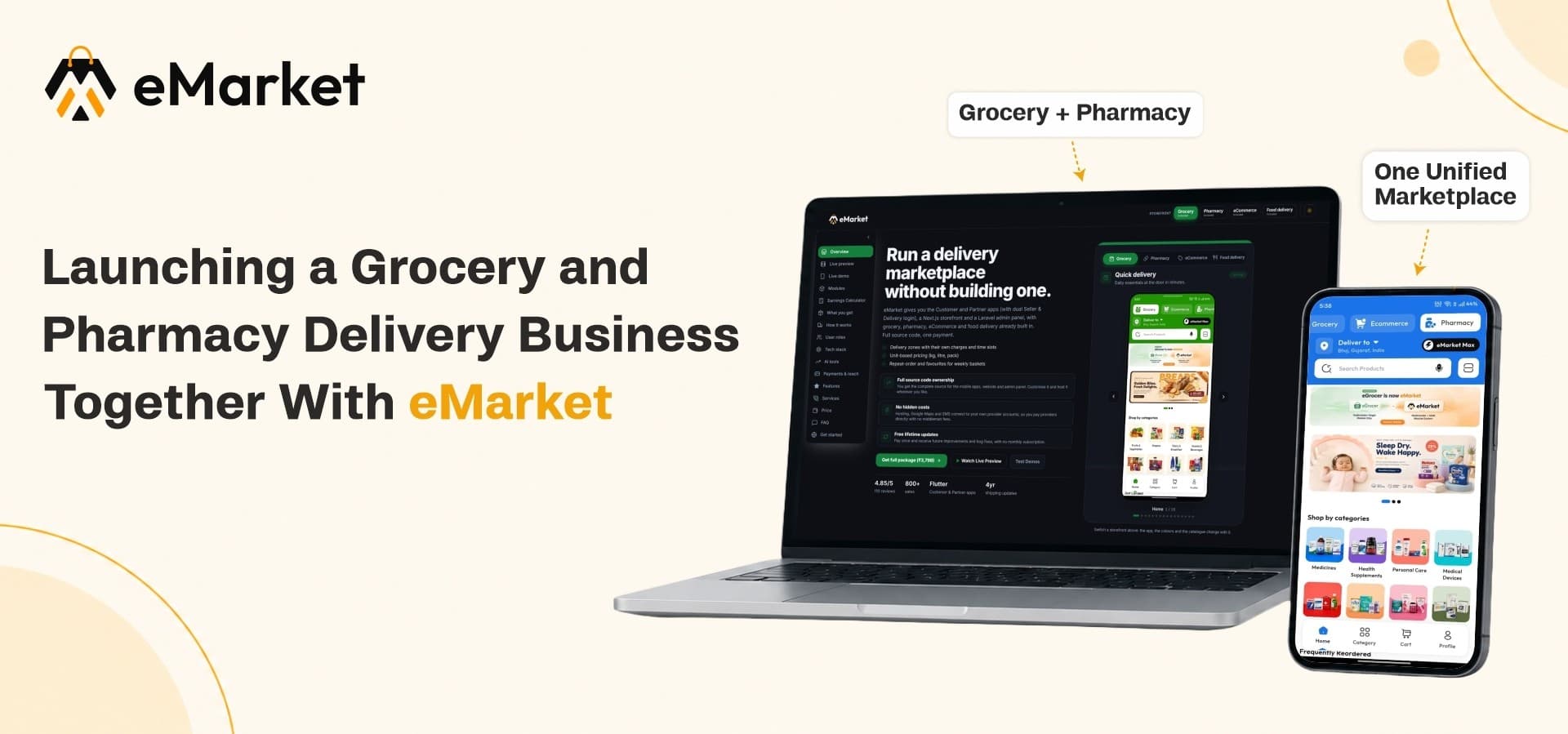
eMarket began as a grocery delivery app and has grown into a platform that runs several business modules from one backend. Grocery, pharmacy and eCommerce are available now, and food delivery is available as well. Parcel delivery and ride booking are planned.
3.1 The Grocery Side
Your sellers list fresh produce, packaged goods and daily essentials. A multi vendor grocery app lets each store manage its own products, prices and stock while customers browse one shared catalogue. Stock updates happen in real time, so shoppers see what is actually available.
3.2 The Pharmacy Side
The pharmacy module sits beside the grocery inside the same system. Licensed chemists join as sellers, add their products, and handle their own orders. Administrators approve listings before they go live. For a pharmacy ecommerce platform, that approval step gives you a useful checkpoint over what appears in your marketplace.
3.3 One App, One Panel
Customers use a single mobile app and website. You manage everything from one admin panel. Behind the scenes, a multi vendor ecommerce app source code foundation built on Flutter, Laravel and Next.js means your Android app, iOS app, web store and admin panel all talk to the same database.
4. Your Step-by-Step Launch Plan
Step 1: Install and Configure the Platform
Start with the store basics: your business name, currency, payment methods and delivery preferences. Platform configuration covers these from one settings area. Extended license buyers also receive ready-to-launch setup, which saves a lot of technical effort at this stage.
Step 2: Activate Your Modules
Switch on grocery and pharmacy. Each module can carry its own taxes, commissions and banners, so your medicine category does not have to follow the same rules as your vegetable category.
Step 3: Build Your Category Structure
Create a clean category tree. For example:
-
Fruits and vegetables
-
Dairy and bakery
-
Household essentials
-
Over-the-counter medicines
-
Health and wellness
-
Personal care
Clear categories help customers find things quickly and help sellers list products in the right place.
Step 4: Set Up Delivery Zones
Draw delivery zones around the areas you serve. Customers are then matched with sellers who can reach them. Starting with a few tight zones is wiser than covering a whole city on day one.
Step 5: Onboard Your First Sellers
Add sellers yourself from the admin panel, or let them apply and review each request. Check their business details, approve the ones you trust, and give them access to their own dashboards. Begin with a small group of reliable stores and pharmacies. Five good sellers beat fifty inactive ones.
Step 6: Recruit Delivery Partners
Add your riders, review their registrations, and set up how they are paid. Riders get their own workspace to see assigned orders, update delivery progress and track earnings.
Step 7: Run a Soft Launch
Invite friends, family and a handful of nearby households to place real orders. Watch where orders slow down, then fix those points before your public launch.
5. Managing Sellers, Riders and Money
A marketplace succeeds when everyone gets paid correctly and on time. eMarket gives each role a dedicated dashboard.
5.1 For Sellers
Sellers manage their products, inventory, orders, returns and earnings. A built-in point of sale lets a store bill walk-in customers from the same system, so online and in-store stock stay in step.
5.2 For Delivery Partners
Riders view assigned deliveries, update status, manage availability and monitor earnings. Cash collection, fund transfers and salary records are tracked in one place, which keeps rider accounts clear.
5.3 For You as the Owner
You see all orders, payments and reports. Withdrawal requests from sellers and riders arrive in one queue, where you approve or reject them and keep a clean payout record. Return requests follow a structured workflow, which is especially helpful when you sell products that customers may need to send back.
6. How the Business Earns Money
The platform supports several income streams from day one:
-
Marketplace commissions: earn a percentage on every order, set separately for each module.
-
Delivery and service fees: charge delivery fees that reflect distance or order size.
-
Featured promotions: sell homepage banners and featured placements to sellers who want more visibility.
-
Subscription plans: offer paid memberships with perks such as free delivery.
-
Promo-led growth: use discount codes and seasonal offers to win first-time customers, then rely on repeat orders.
If you later add restaurants, a multi vendor food ordering system inside the same platform opens another stream without any new infrastructure.
7. Mistakes to Avoid
-
Launching too wide: a smaller area with fast deliveries earns trust quicker than a big area with late ones.
-
Ignoring seller quality: one chemist who cancels orders can damage your whole brand.
-
Skipping local rules: medicine sales carry legal responsibilities, so understand them before going live.
-
Treating the app as finished: watch your reports weekly and adjust zones, prices and promotions.
-
Neglecting support: use notifications and email tools to keep customers, sellers and riders informed.
8. Where eMarket Fits
A multi vendor ecommerce script only helps if it saves you real time. With eMarket you receive the customer apps, seller and delivery tools, website and admin panel as one package, rather than stitching them together yourself. The source code comes with lifetime updates, and you can start with grocery and pharmacy, then add more modules as demand grows.
Ready to Launch Both Businesses Under One Brand?
Explore eMarket, check the live demos, and pick the license that fits your plan: